Halloween profile picture maker: six square avatars from one selfie
A Halloween profile picture only has to work at the size of a thumbnail, inside a circle, for about four weeks. These six styles are written for exactly that: a square, face-centred avatar made from your own selfie, from a film-noir vampire to a 16-bit pixel witch, ready to set on Discord, Instagram or TikTok before October 31.
Upload a clear selfie, pick a style and generate. Every prompt says what to keep (your face, skin tone, age and hair) and what to change. The examples below were all made from one test selfie so you can compare the styles side by side.
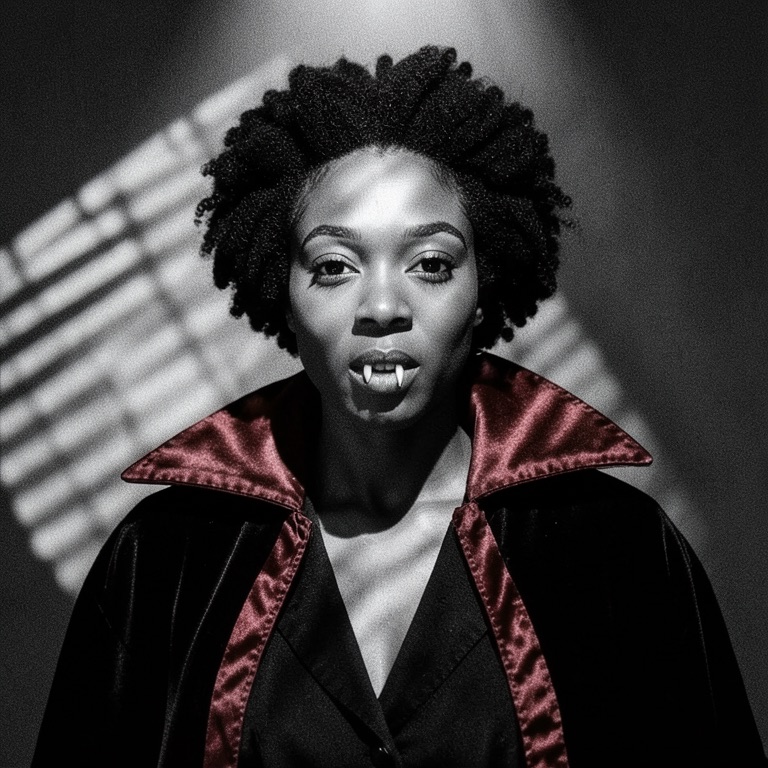
Velvet Noir Vampire Avatar
Black-and-white film noir with one colour: the red lining of a high-collared cape. Hard top light and blind-slat shadows read well even at 48 pixels.
Image editing prompt
Turn this selfie into a square Halloween profile picture: a black-and-white film-noir vampire portrait. Keep the person's face, identity, skin tone, age, face shape, eye colour and hairstyle exactly as in the photo; do not slim or smooth the face. Change only the styling: a high-collared black cape with a deep red satin lining, a dark waistcoat, a subtle pale tint to the skin while keeping its original undertone, two small neat fangs only if the mouth is open. Lighting: a single hard spotlight from above at 45 degrees with venetian-blind shadow stripes across the wall behind. Head and shoulders centred, face filling the middle of the frame so it survives a circular crop. Monochrome with only the cape lining in deep red, 35mm film grain. Avoid blood, gore, extra people, text, logos, watermarks.
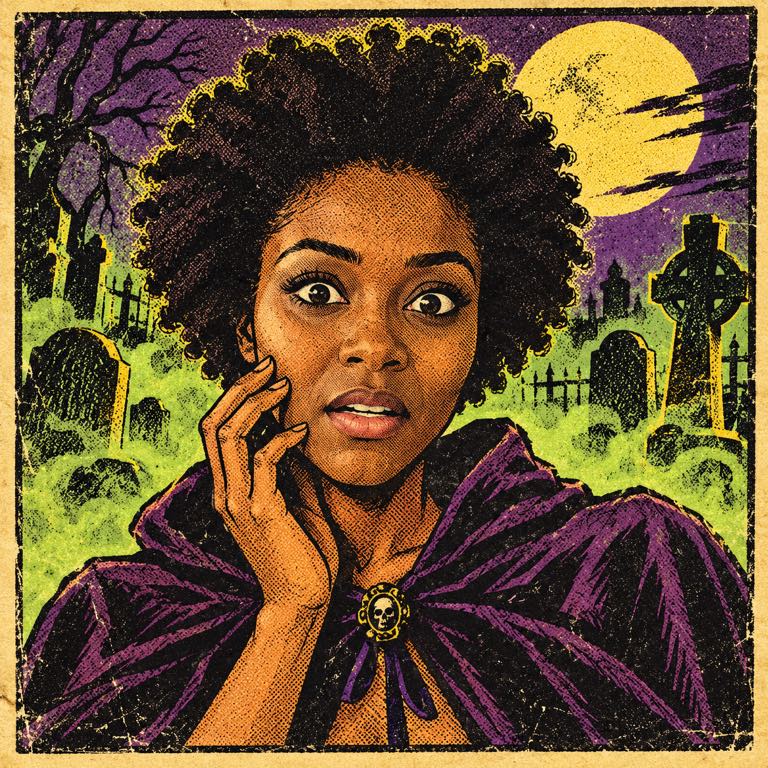
Pulp Horror Comic Panel
You, redrawn as a startled hero of a 1950s horror comic: thick ink lines, halftone dots, acid green and purple, a foggy graveyard behind.
Image editing prompt
Redraw this selfie as a square Halloween profile picture in the style of a 1950s pulp horror comic panel. Keep the person recognisable: same face shape, features, skin tone, age, hairstyle and expression intensity, drawn with bold ink outlines. Change the setting: a moonlit graveyard with crooked headstones and a green fog behind them, a startled wide-eyed expression, one hand raised near the cheek. Colour it like old newsprint: Ben-Day halftone dots, limited palette of acid green, purple, mustard yellow and black, slightly off-register printing, yellowed paper texture. Head and shoulders centred in a square panel with a thick black border. No speech bubbles, no lettering, no logos, no watermark, no extra people.
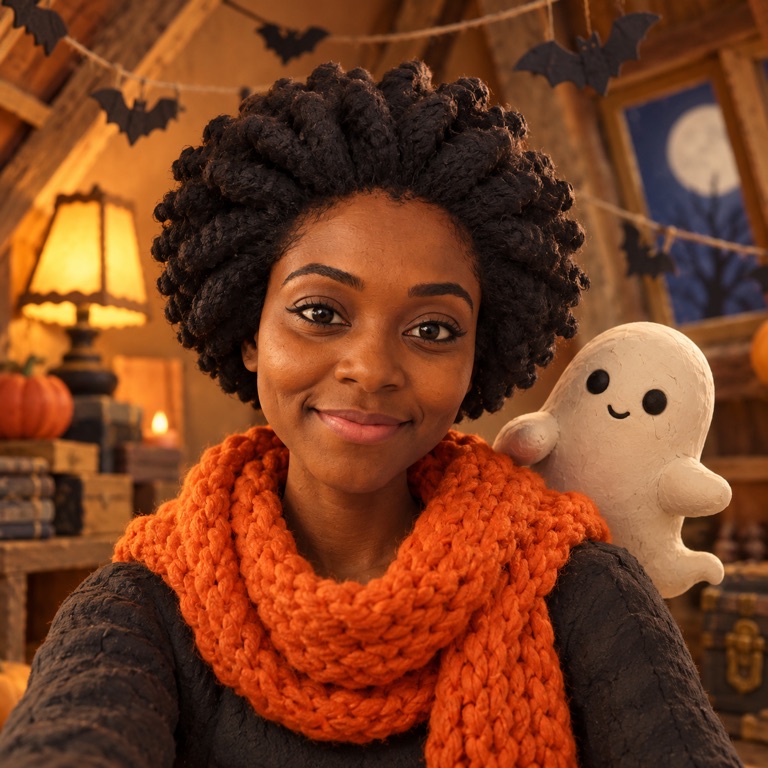
Claymation Ghost Buddy
A stop-motion clay version of you in a knitted scarf, with a small white ghost peeking over your shoulder. Friendly enough for a work Slack.
Image editing prompt
Make a square Halloween profile picture from this selfie as a stop-motion claymation scene. Recreate the person as a handmade clay figure with a fingerprint-textured surface that still looks like them: same face shape, skin tone matched in the clay, hairstyle sculpted in clay, same age and expression. Dress the figure in a chunky knitted orange scarf. Beside their shoulder floats a small round friendly ghost made of white clay with two dot eyes, peeking out and smiling. Background: a miniature cardboard set of a cozy attic with tiny paper bats on strings and a warm lamp. Soft studio lighting, shallow depth of field like a stop-motion film still. Head and shoulders centred. No text, no logos, no extra people.
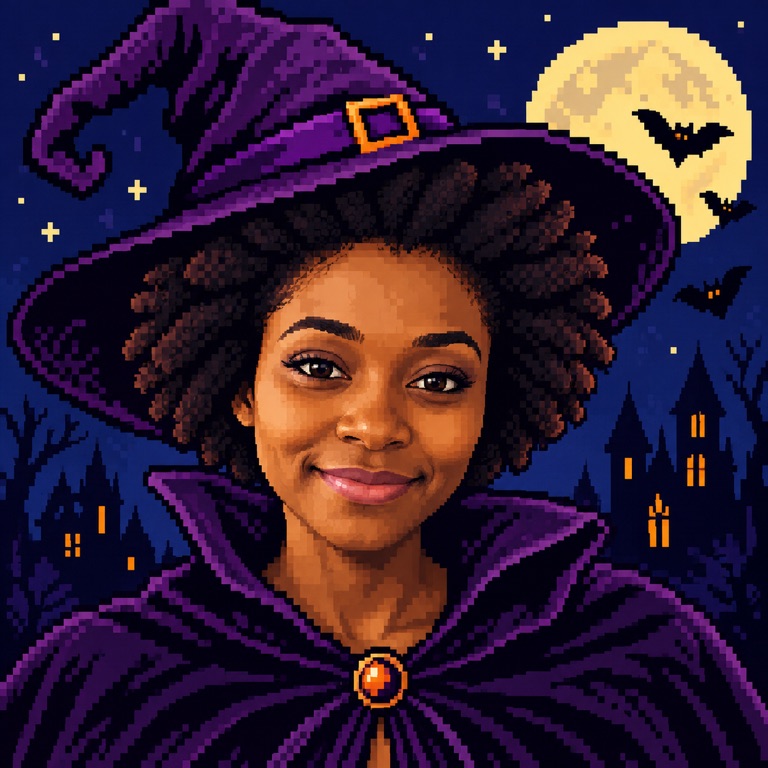
16-Bit Pixel Witch
A retro game portrait with a crooked purple hat, a pixel moon and three bats. Crisp square pixels stay sharp at tiny avatar sizes.
Image editing prompt
Convert this selfie into a square 16-bit pixel-art Halloween avatar of a witch. Keep the person identifiable: same skin tone in the pixel palette, same hair colour and hairstyle, same face shape and age, recognisable eyes and brows. Add a tall crooked purple witch hat with a small orange buckle and a dark violet high-collar cloak. Background: a flat night sky in deep navy with a large pixel full moon and three tiny pixel bats, a few stars. Crisp visible square pixels, limited 32-colour palette, clean dark outlines, no anti-aliasing blur, like a retro game character portrait. Head and shoulders centred, filling the frame. No text, no UI elements, no logos, no watermark.
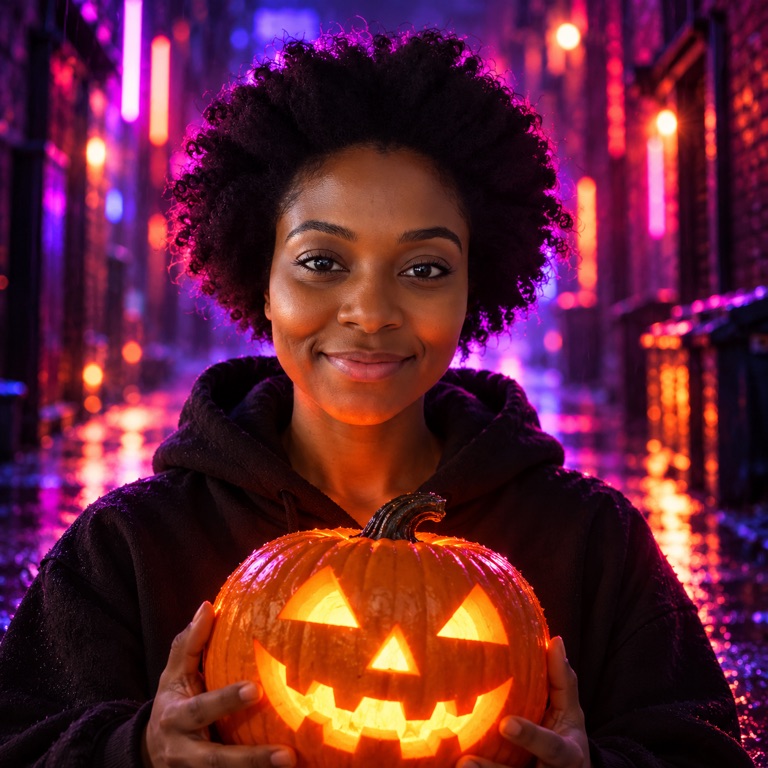
Neon Jack-o'-Lantern Glow
Photographic and moody: a glowing carved pumpkin lights your face from below while magenta neon rims you from behind in a rainy alley.
Image editing prompt
Turn this selfie into a square Halloween profile picture lit by neon. Keep the person's face, identity, skin tone, age, face shape and hairstyle exactly as in the photo, with realistic skin texture. Change the outfit to a plain black hoodie. The person holds a carved jack-o'-lantern at chest height that glows bright orange from inside, casting warm orange light up onto the chin and cheeks, balanced by a magenta and electric-purple neon rim light from behind. Background: a dark rainy alley with blurred neon signs shaped only as abstract tubes, wet reflections, bokeh. Cinematic, high contrast, portrait lens. Head and shoulders centred. Do not lighten or change the skin tone; no readable signs, no text, no logos, no extra people.
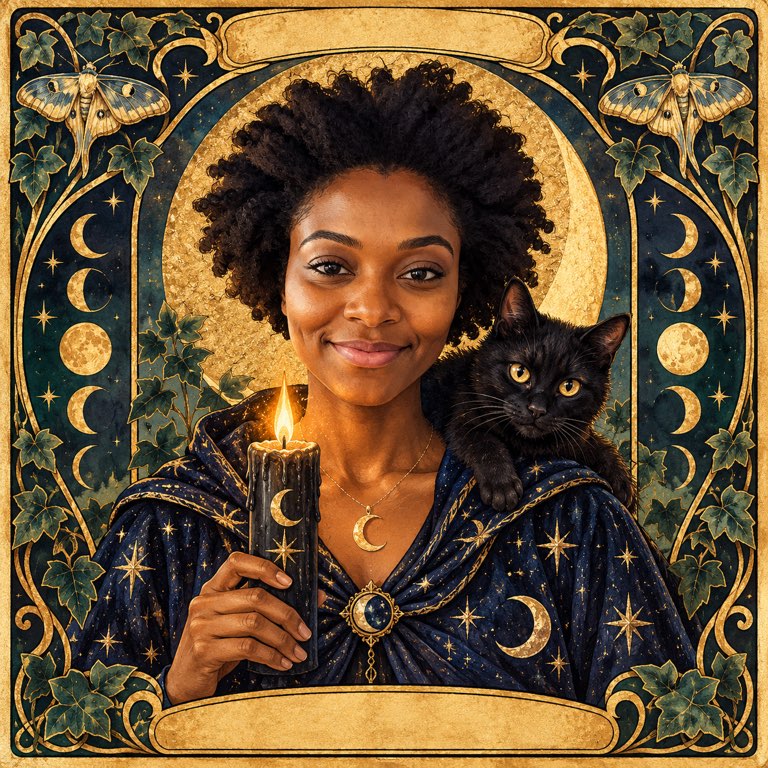
Midnight Tarot Card Portrait
A painted tarot card with you at the centre: star-embroidered robe, black candle, crescent moon and a black cat on your shoulder, framed in gold.
Image editing prompt
Make a square Halloween profile picture from this selfie styled as a hand-painted tarot card portrait. Keep the person's face, identity, skin tone, age, face shape and hairstyle faithful to the photo. Paint them in a flowing midnight-blue robe embroidered with silver stars, holding a lit black candle, a crescent moon and a small black cat sitting on one shoulder. Behind them: a gold arch with an art nouveau frame of moths, moon phases and ivy, deep teal and antique gold palette, gouache texture, gold leaf highlights. Face in the centre of the frame so a round crop keeps it. Leave the card's top and bottom banners empty with no lettering, no numbers, no logos, no watermark, no extra people.
The examples were made from one fictional AI-generated selfie during testing: the noir vampire with an open image model (FLUX.2 klein), the other five with ChatGPT image generation. None came from Nano Banana 2; your result depends on your photo and the model you select.
Make your Halloween avatar
"Use this look" loads the prompt with Nano Banana 2 Edit and a 1:1 square. Upload your selfie, check the credit cost and generate. You can switch to another editing model in the panel.
Add inputsAttach images, videos, or audio that are part of what you want to create.
0/4
JPG, PNG, WebP · 20 MB max
Just add the material you need. The generator will use it automatically.
0 / 5000
Generate a new image from text, or upload a photo and describe the edit. The cost is shown before you submit.
Each style is an image-editing prompt for Nano Banana 2 Edit at 1:1, written to keep your face and skin tone and change only the costume, light and background.
Faces are kept in the middle of the frame so the circular crop on Discord, Instagram and TikTok does not cut off your chin or hair.
The PhotoCraft editor is free: open the result there to tighten the crop, add a border or a name layer, and export a PNG.
AI edits use credits and the cost is shown before you submit; there is no free AI credit on PhotoCraft.
Why a profile picture needs a different recipe from a costume photo
A costume portrait is looked at full screen. A profile picture is mostly seen at 32 to 128 pixels next to a username, and Discord, Instagram and TikTok all show it inside a circle. Detail that looks great large, such as a busy background or a full-length outfit, turns into noise at that size. What survives is a clear face, one strong colour idea and a silhouette: a hat brim, a cape collar, a glowing pumpkin.
That is why every style above asks for head and shoulders, face in the middle of a square frame, and a limited palette. The noir vampire keeps everything grey except one red; the pixel witch is built from flat colour blocks; the neon style relies on two light colours, orange from below and magenta from behind.
Pick the selfie that will work
The editing model can only keep what it can see. A sharp, evenly lit photo gives the most faithful likeness; a dim, filtered or heavily angled one gives the model room to guess.
Face the camera or turn slightly; both eyes visible.
Daylight from a window in front of you, not behind you. Avoid beauty filters, which the model will copy.
Shoulders in the frame. The styles add collars, scarves and capes there.
Hair as you normally wear it. If you want a different colour, add one line to the prompt, for example "change the hair to deep purple", rather than hoping the style does it.
Only upload photos of yourself or of people who have agreed to it.
Finish it in the PhotoCraft editor
Download the result and open it in the free PhotoCraft online editor. Editing runs in your browser on your own device. A few small passes make an avatar look deliberate:
Check the circle Draw an elliptical selection from corner to corner of the square to preview the round crop. If the chin or hat is cut, scale the image layer down slightly on a filled background.
Lift the face Add a Curves or Brightness/Contrast adjustment layer and mask it to the face, so it stands out at thumbnail size.
Add a ring For an October ring like a stream badge, add a new layer with a stroked circle in orange or purple.
Export Export a square PNG at 1024 × 1024 or larger. Every platform scales it down, and it stays crisp on high-density screens.
Matching avatars for a Discord server or a group chat
Servers and friend groups often switch to a shared theme for October. Pick one style, keep the prompt identical and run it once on each person's selfie so the set matches. PhotoCraft's batch page has an AI batch edit that applies one prompt to many photos; each photo is a separate AI edit and is charged at the price shown, so ask everyone for permission to use their photo first.
For a set, the pixel witch and the claymation ghost buddy work best because the style is strong enough to tie different faces together. Change one detail per person, such as the hat colour or the ghost's expression, so the avatars are not identical in the member list.
What it costs
The PhotoCraft editor, its downloads and local batch tools for up to 10 images are free. AI image editing uses credits: the panel shows the exact cost for the selected model before you submit, and nothing is charged until you generate. PhotoCraft does not include free AI credits, so check the quote on the Pricing page if you plan to make several versions.
Frequently asked questions
How do I make a Halloween profile picture from my selfie?
Choose a style above and press "Use this look", upload your selfie in the panel, check the credit cost and generate. The prompt is already set for a 1:1 square with your face centred. Download the result and set it as your avatar, or open it in the PhotoCraft editor first to adjust the crop.
What size should a Halloween profile picture be?
Upload a square image of at least 512 × 512 pixels; 1024 × 1024 PNG is a safe choice for Discord, Instagram and TikTok. All three show it as a circle, so keep your face in the centre and leave a little space around the head.
Will the avatar still look like me?
Each prompt tells the model to keep your face, skin tone, age and hairstyle, and the photo-based styles (noir vampire, neon glow) stay closest to your real look. Drawn styles such as the comic panel and the pixel witch simplify features by design. A clear, front-lit selfie gives the best likeness.
Can I use these as Discord or Twitch avatars?
Yes. The results are square images you download and upload yourself. Discord also shows animated avatars for subscribers, but these styles produce still images.
Is the PhotoCraft editor needed?
No. The AI result is ready to use. The free editor is there if you want to tighten the crop, add a border or a name layer, or export in another format.
Is it free?
The editor is free. AI generation uses credits, and the exact cost appears in the panel before you submit. PhotoCraft does not include free AI credits.
Updated 2026-10-20. photocraft.my is an independent site. PhotoCraft is open-source software by Storyteller and the ArtCraft community; this site is not affiliated with them or with Adobe.